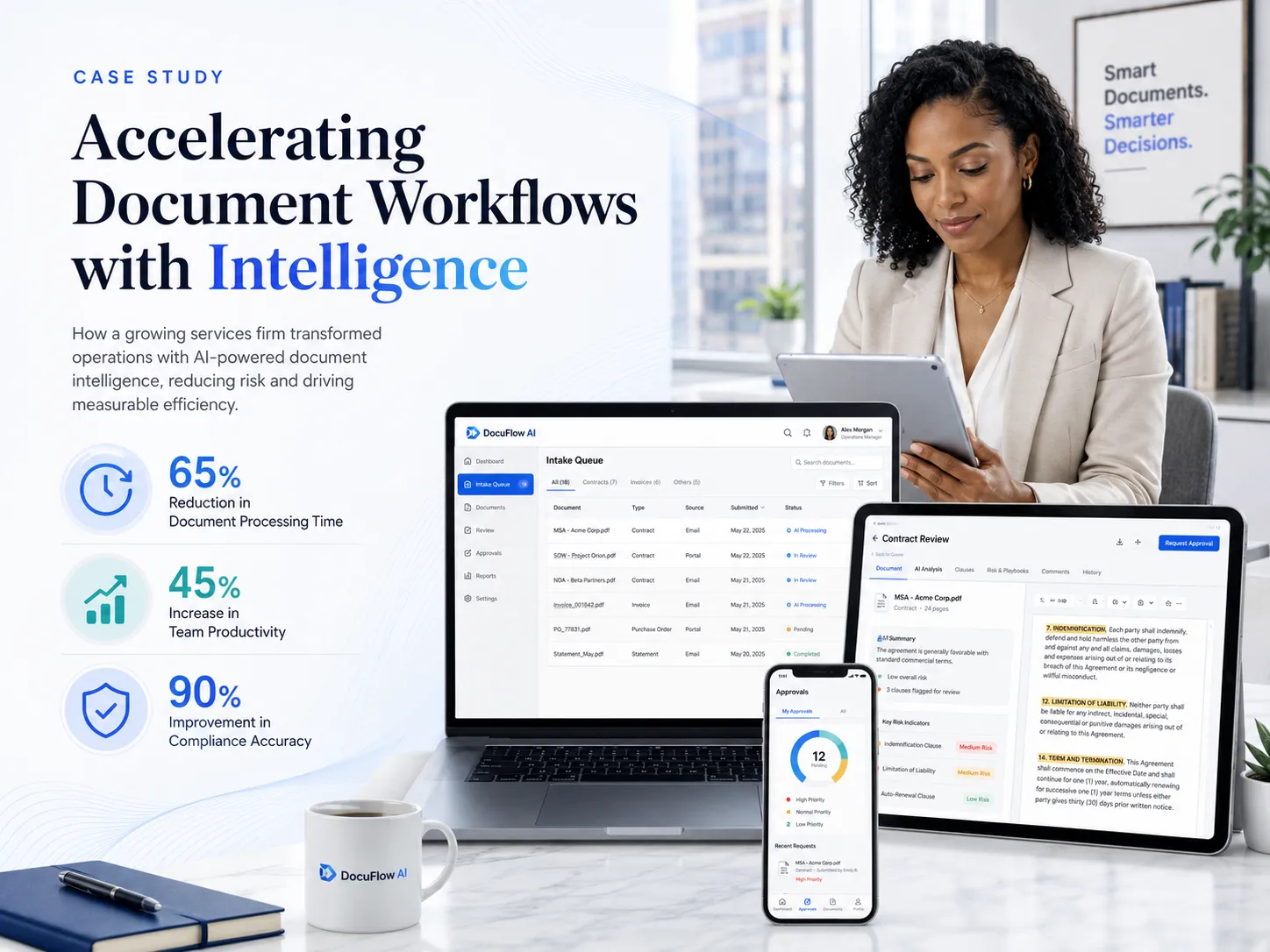


DocuFlow AI turns manual document review into an intelligent approval workflow

AblyCode designed an AI-powered document intelligence platform that helps business teams extract key information from contracts, invoices, forms, purchase orders, and operational documents, then route them through structured review and approval workflows. Built as an AI-native document operations layer, DocuFlow AI combines document classification, field extraction, summarization, risk flags, human approvals, audit logs, and system integrations in one secure platform for modern operations teams.
DocuFlow AI Screenshot 1DocuFlow AI Screenshot 2DocuFlow AI Screenshot 3
Header image
Industry
AI / Document Intelligence / Business Operations
Services
  • Technology consulting
  • Product strategy
  • UI/UX design
  • Software engineering
  • Generative AI integration
  • Document intelligence
  • Workflow automation
  • Cloud / DevOps
  • QA services
  • Application management
Team
  • Product strategist
  • Lead engineer
  • AI engineer
  • Data engineer
  • Full-stack developers
  • UI/UX designer
  • QA engineer
  • DevOps engineer
Results
Faster document review, lower manual extraction effort, better approval visibility, stronger auditability, and more consistent handling of business-critical documents.

AblyCode helped us move from manual document handling and scattered approval chains to a structured document intelligence workflow. What stood out was their ability to combine AI extraction, product thinking, and governance into a system that felt practical, secure, and easy for operations teams to adopt.

Head of Operations

About DocuFlow AI: an intelligent document operations layer

Business teams often handle documents through fragmented processes: email attachments, shared drives, spreadsheets, manual approvals, ERP uploads, scanned PDFs, vendor portals, and internal messaging.
The result is familiar: teams spend too much time reading documents, copying values, checking missing fields, comparing versions, chasing approvals, and manually updating downstream systems.
DocuFlow AI was imagined as a response to that problem.
Instead of treating document review as a slow manual task, the platform acts as an AI-powered document operations layer. It classifies incoming documents, extracts important fields, summarizes key information, highlights risks, routes items for review, and keeps a full audit trail.
Human teams remain in control, but repetitive document work gets compressed dramatically. The result is a system that helps operations, finance, legal, procurement, and customer teams process documents faster without losing control, visibility, or compliance discipline.

DocuFlow AI x AblyCode: what the platform includes

Over time, AblyCode would shape DocuFlow AI as a modular document intelligence platform with upload workflows, AI extraction pipelines, review screens, approval routing, exception handling, and integration infrastructure that fits into modern business operations.

Milestone 1:
AI Document Intake and Classification

The first layer of the platform helps teams collect, organize, and classify incoming documents. When a document enters the system, the AI classifies its type, identifies the business context, detects missing information, and assigns it to the right workflow.
Result: Faster document sorting, reduced manual intake work, cleaner routing across finance, procurement, legal, and operations teams.
What we did:
  • Designed a document intake workspace where users can upload, review, and organize documents in structured queues.
  • Built AI classification workflows for invoices, contracts, purchase orders, forms, reports, and customer submissions.
  • Added metadata detection for vendor name, document type, date, amount, customer, department, and priority.
  • Created routing rules so documents move automatically to the right review workflow based on type, risk, and business context.

Milestone 2:
Key Field Extraction and Validation

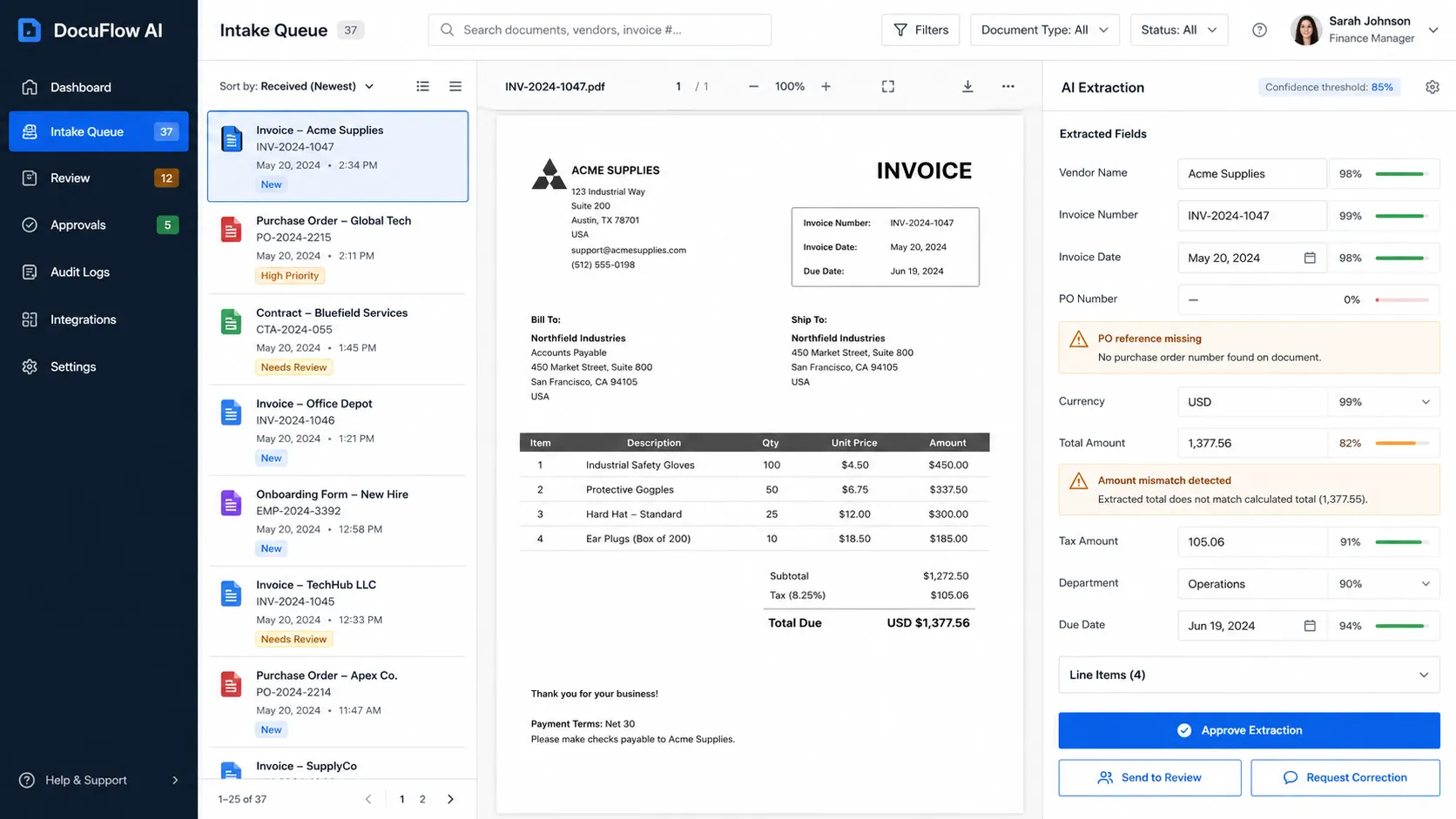
Manual data extraction is one of the biggest bottlenecks in document-heavy workflows. DocuFlow AI extracts key fields from documents and validates them against expected formats, required values, and connected business systems.
Result: Lower data-entry burden, fewer extraction mistakes, faster movement from document received to document ready for review.
What we did:
  • Designed extraction screens where users can compare original documents with AI-extracted fields.
  • Built extraction workflows for invoice numbers, amounts, dates, vendor details, line items, contract terms, tax fields, and approval metadata.
  • Added confidence indicators so reviewers can quickly see which fields need attention.
  • Created validation rules for missing fields, mismatched values, duplicate documents, and unusual document patterns.

Milestone 3:
Document Summary and Risk Flagging

Not every reviewer needs to read every page from the beginning. DocuFlow AI summarizes document contents and highlights risks so teams can focus on what matters.
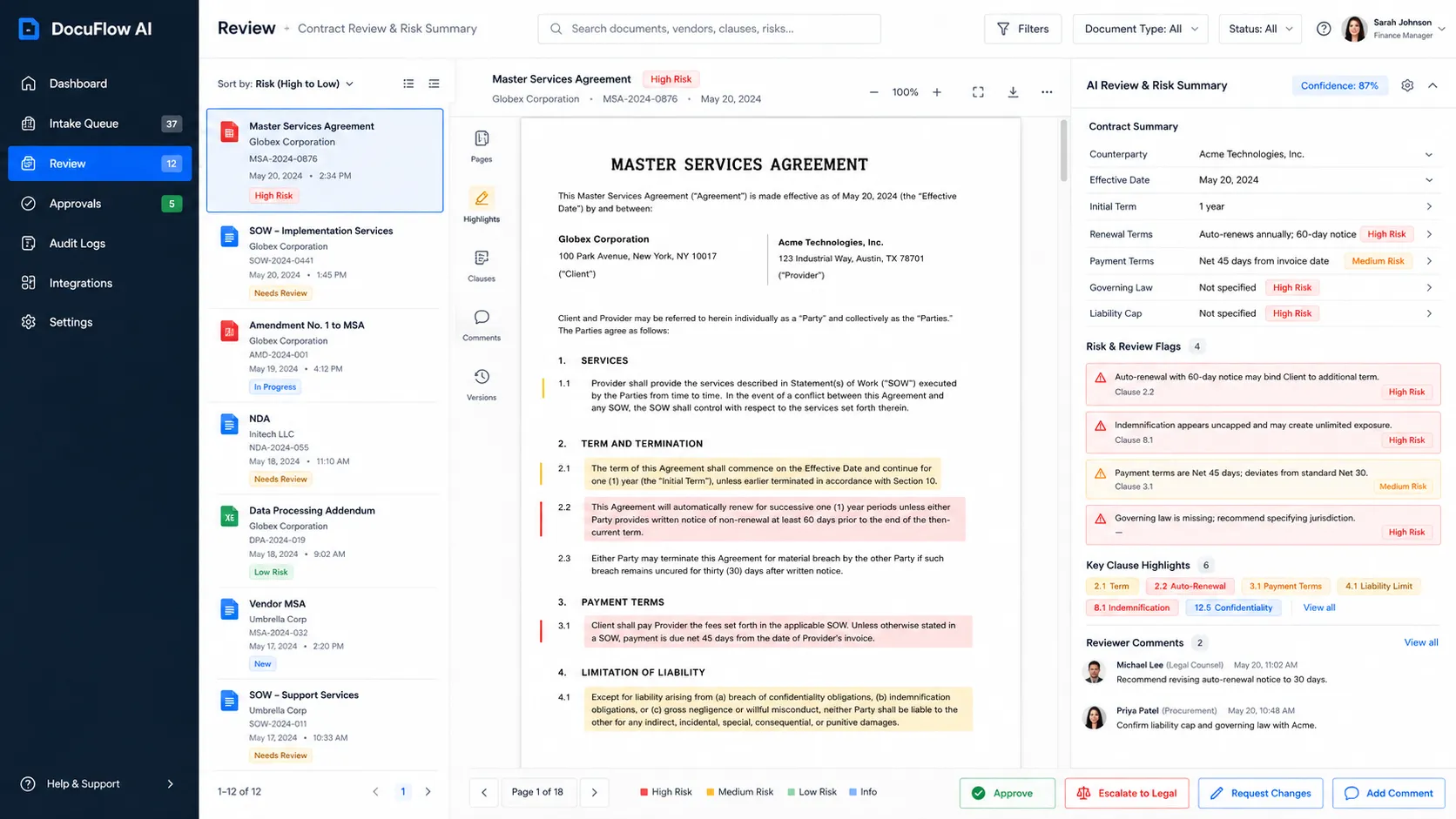
For contracts, the platform can surface key obligations, renewal terms, termination clauses, payment terms, liability language, and unusual conditions. For invoices, it can flag amount mismatches, duplicate invoice numbers, missing purchase order references, and payment exceptions.
Result: Faster review cycles, better risk visibility, more consistent handling of contracts, invoices, and operational documents.
What we did:
  • Designed AI summary panels that turn long documents into structured review-ready summaries.
  • Built risk detection workflows for missing information, unusual clauses, duplicate invoices, inconsistent amounts, and approval exceptions.
  • Added source-linked summaries so reviewers can trace AI outputs back to the document section that informed them.
  • Created review states for low-risk, needs-review, high-priority, and exception-based routing.

Milestone 4:
Human Approval and Exception Workflows

DocuFlow AI does not treat AI extraction as automatic approval. The platform includes human-in-the-loop review so business teams can approve, edit, reject, or escalate AI-generated outputs.
Result: Safer automation, clearer approval ownership, better control over high-risk or business-critical documents.
What we did:
  • Designed approval inboxes for finance, procurement, legal, operations, and management reviewers.
  • Built configurable approval paths based on document type, value threshold, vendor, department, and detected risk.
  • Added reviewer actions such as approve, request correction, escalate, assign owner, and send back for clarification.
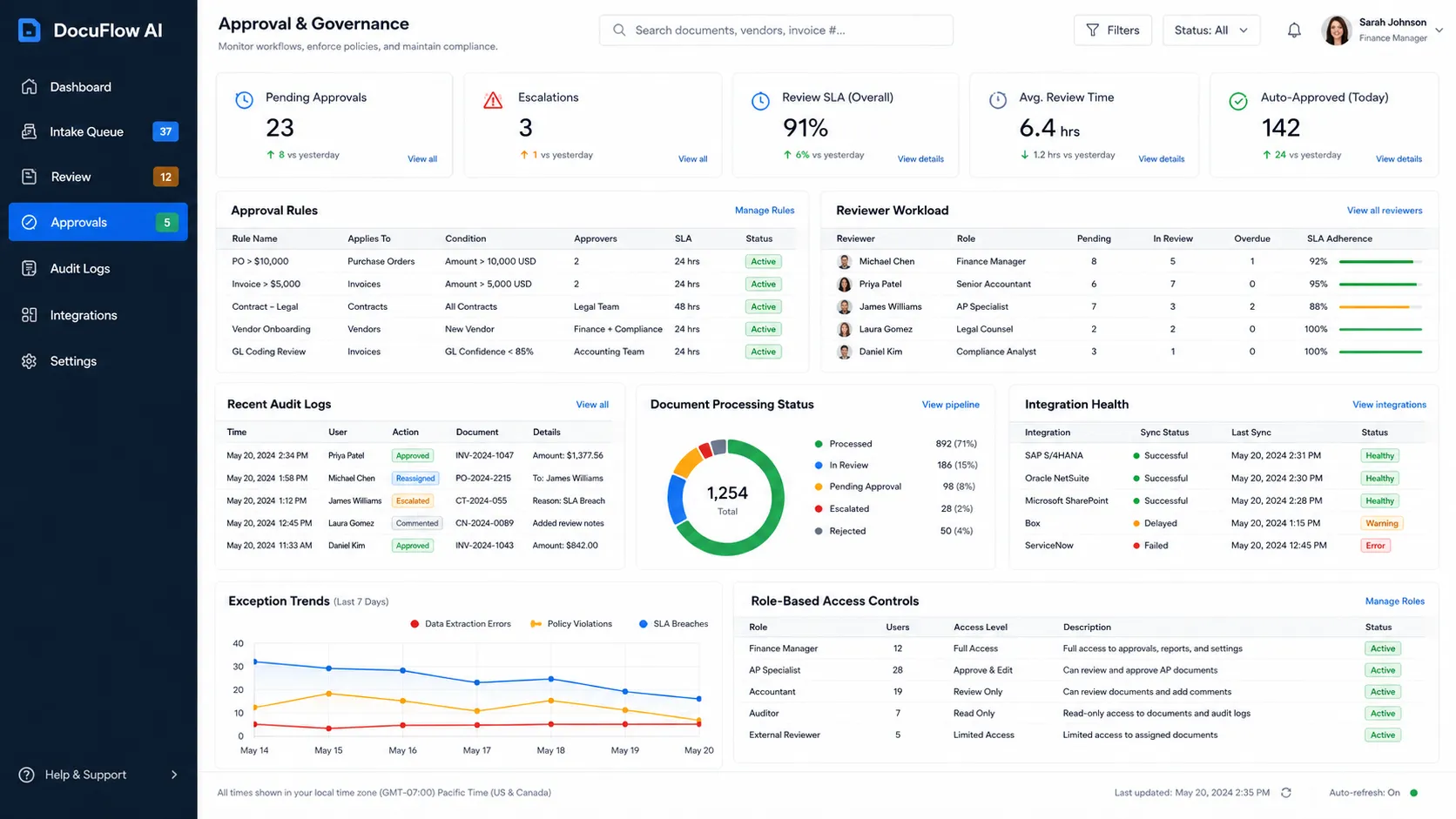
  • Created audit trails for every extracted field, reviewer change, approval decision, and final system action.

Milestone 5:
Integrations, Audit Logs, and Document Governance

The platform becomes enterprise-ready when document workflows connect to the systems where teams already work. DocuFlow AI includes integrations, audit logs, document status tracking, and admin governance controls.
Result: Cleaner operational handoffs, stronger compliance visibility, better document lifecycle management across teams and systems.
What we did:
  • Built integration-ready workflows for ERP, CRM, accounting systems, cloud storage, email inboxes, and internal APIs.
  • Designed audit log views for document uploads, extraction results, reviewer actions, approvals, exports, and system sync events.
  • Added role-based access control so users only see documents and fields they are authorized to review.
  • Created admin controls for document types, extraction rules, approval thresholds, reviewer roles, and escalation settings.

AblyCode's engineering standards applied inside DocuFlow AI

We approached DocuFlow AI as an enterprise document operations product, not as a simple PDF chatbot. That means extraction quality, human approvals, auditability, integration reliability, and data privacy all matter as much as the AI model itself.
1

Human review before sensitive actions

Not every AI extraction should become a system update automatically. We designed the platform so invoices, contracts, approvals, and document exceptions can be routed through configurable review layers based on risk, amount, document type, and business rules.

2

Explainable document intelligence

Operations teams will not trust black-box extraction. The platform exposes where each extracted value came from, how confident the system is, and which section of the document supports the result. This makes review faster and helps teams catch exceptions before they become operational problems.

3

Workflow automation with guardrails

We separated responsibilities across focused workflows: document classification, field extraction, risk review, approval routing, exception handling, and system sync. That keeps automation easier to test, govern, and scale.

4

Integration-first architecture and secure document handling

A document platform only works when it fits the existing business stack. We designed the system to connect with email, cloud storage, ERP, accounting tools, CRM, and internal workflow systems. The platform was conceived for secure document processing with role-based access, audit logs, encryption-ready storage, queue-based processing, retries, monitoring, and admin controls built in from the start.

Their focus on workflow clarity and secure AI adoption was critical. AblyCode understood that document automation is not just about extracting text. It is about review, control, approvals, exceptions, and making sure the right people can trust the output.

Head of Operations

What the product experience looks like

The user experience is designed around document review, not technical AI prompts.
An operations user opens the workspace and sees which documents are new, which are waiting for review, which have missing fields, and which are high-risk.
A finance reviewer sees extracted invoice fields, duplicate warnings, purchase order matches, approval history, and payment readiness.
A legal reviewer sees contract summaries, risk clauses, source-linked highlights, and required approval steps.
An admin sees document types, extraction rules, approval thresholds, user permissions, integration health, audit logs, and exception trends.
Each role gets a different control surface, but all of them work from the same governed document intelligence platform.

Value delivered

Faster document review

Teams spend less time reading, sorting, and manually extracting information from business documents.

Lower manual data-entry effort

AI extraction and validation reduce repetitive copying of values from PDFs, forms, invoices, and contracts into downstream systems.

Better approval visibility

Managers and reviewers can see where each document sits, who needs to act, and what is blocking completion.

Stronger risk detection

Potential issues such as missing fields, duplicate invoices, unusual clauses, mismatched values, and approval exceptions become visible earlier.

Cleaner operational handoffs

Approved document outputs can be synced into accounting, ERP, CRM, or workflow systems in a controlled way.

Enterprise-ready AI adoption

The platform demonstrates how generative AI can be introduced into document-heavy operations with governance, auditability, explainability, role-based control, and human review.
Call to action background
Work with us on your next project