

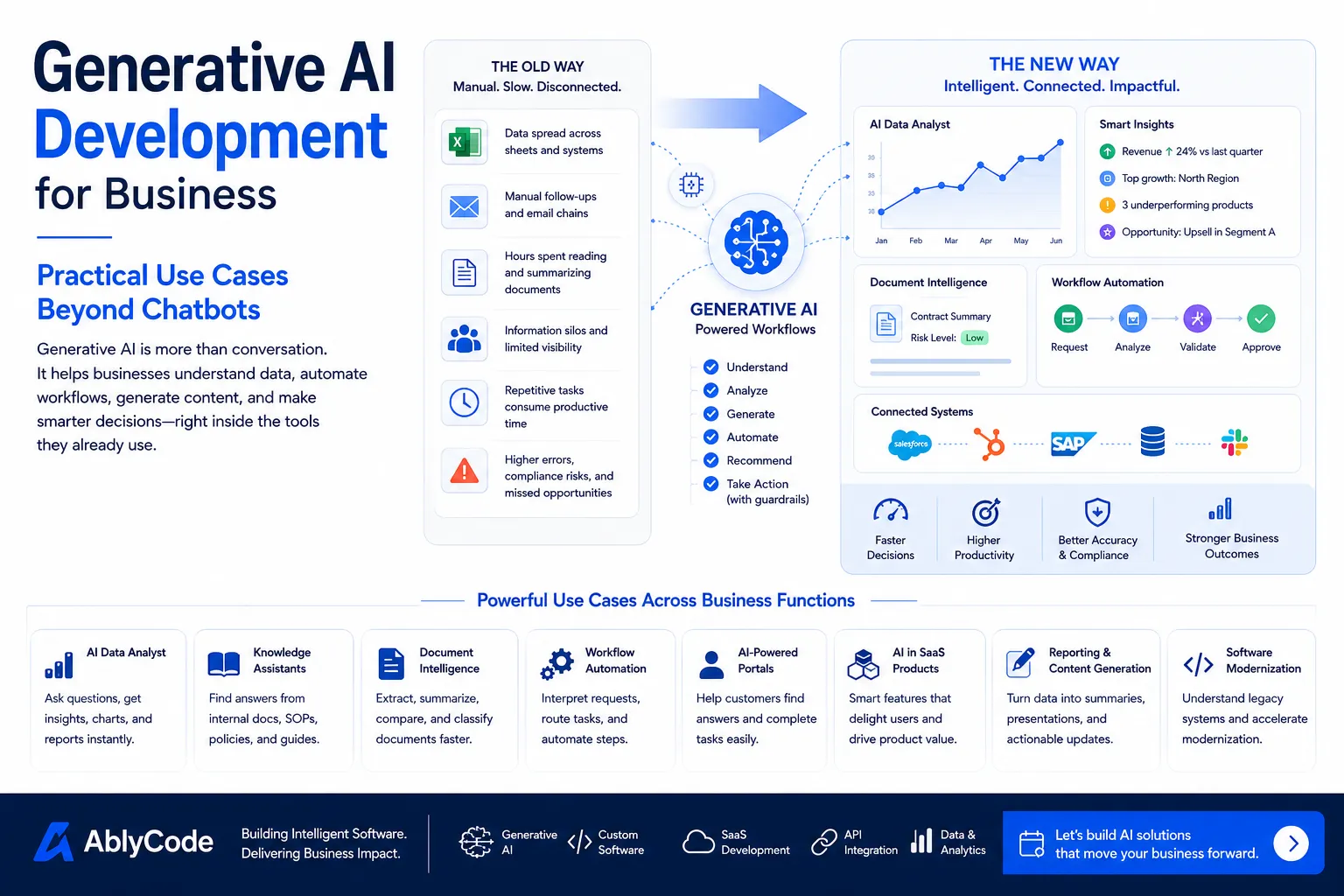
For many businesses, the first idea that comes to mind when they hear generative AI is a chatbot.
That is understandable.
Chatbots are visible, easy to imagine, and simple to explain. A user asks a question, and the system responds. For customer support, internal help desks, and knowledge search, that can be useful.
But generative AI development is becoming much bigger than chatbots.
The real opportunity is not only conversation. It is helping businesses understand information, automate workflows, generate outputs, summarize complex data, support decisions, and make software easier to use.
A chatbot answers a question.
A well-designed generative AI system can help complete a business process.
That difference matters.
As more companies explore AI, the question should not be, Can we add a chatbot?
The better question is:
Where can generative AI reduce effort, improve decisions, and make our existing workflows faster?
The first wave of generative AI adoption was mostly about visible interfaces.
Companies added AI chat windows, content assistants, support bots, and knowledge search tools.
Those use cases still have value, but they are only the beginning.
The next stage is more practical.
Generative AI is becoming part of business software infrastructure. It can sit inside dashboards, SaaS platforms, internal tools, CRM workflows, document systems, analytics products, and customer portals.
Instead of being a separate tool, AI becomes a layer inside the software people already use.
That is where generative AI development becomes more valuable.
It does not ask users to leave their workflow. It helps them move faster inside the workflow.
A chatbot is only one interaction model.
It works well when the user knows what to ask and the answer is mostly informational.
But many business problems are not just question-answer problems.
They involve documents, rules, approvals, data, systems, exceptions, and actions.
For example, a manager may not only want to ask:
What changed in sales this month?
They may also need:
Show the change as a chart.
Compare it with last year.
Find the underperforming regions.
Prepare a summary for leadership.
Export the result for a meeting.
That is no longer just chat. That is analytics, workflow, reporting, and decision support.
Similarly, a finance team may not only want to ask:
What invoices are delayed?
They may need the system to group invoices by risk, identify missing approvals, draft follow-up messages, and show which accounts need attention.
That is where generative AI becomes useful as a business application capability, not just a conversational feature.
One of the strongest business use cases for generative AI is the AI data analyst.
Many companies already have dashboards and reports, but business users still struggle to get answers quickly.
They may need to ask an analyst, export data to Excel, apply filters, create charts, or wait for a report.
An AI data analyst changes this experience.
Users can ask business questions in plain English:
Show revenue by region for the last quarter.
Which products had the highest growth?
Compare this year's sell-out with last year.
Show this as a bar chart.
Export this to Excel.
The AI system connects the question to the right data, generates the result, and presents it as a chart, table, or summary.
This is valuable because it makes analytics more accessible to business users who may not know SQL, BI tools, or data models.
The best AI data analyst systems are not just chat interfaces. They need secure data access, role-based permissions, trusted metrics, chart generation, export options, and clear explanations when data is incomplete.
Every growing company creates internal knowledge.
Policies, SOPs, product notes, customer documents, support guides, technical documentation, onboarding material, project history, meeting notes, and operational playbooks keep expanding.
The problem is that employees often do not know where the right information lives.
A knowledge assistant helps teams ask questions across internal documents and get answers with source context.
Examples:
What is our refund policy for enterprise customers?
Where is the onboarding checklist for new clients?
What are the deployment steps for this product?
Which support article explains this issue?
This can reduce repeated questions and help new team members become productive faster.
However, business knowledge assistants must be designed carefully. They should use approved sources, respect permissions, cite where answers came from, and avoid guessing when information is missing.
A useful knowledge assistant is not just a search box. It is a trusted knowledge layer.
Many businesses still spend hours reading, comparing, and extracting information from documents.
Contracts, invoices, purchase orders, resumes, insurance forms, reports, compliance files, PDFs, and customer submissions often require manual review.
Generative AI can help by extracting useful information, summarizing long documents, comparing versions, identifying missing fields, and routing documents to the right workflow.
Examples:
Summarize this contract and highlight key obligations.
Extract invoice number, vendor name, amount, and payment date.
Compare these two policy documents and show what changed.
Find missing documents in this customer onboarding package.
Classify this request and send it to the right department.
This is especially useful when document volume grows and manual review becomes slow.
The goal is not to remove human review from every decision. The goal is to reduce manual reading and prepare better inputs for human judgment.
Traditional automation works best when rules are fixed.
If this happens, do that.
But many business workflows include messy inputs, exceptions, unclear requests, and unstructured information.
Generative AI can help interpret the input before the workflow continues.
For example:
A customer sends an email with a request.
The AI identifies the request type.
It extracts important details.
It checks whether required information is missing.
It suggests the next step.
It routes the task to the right team.
This can be useful in sales operations, customer support, finance operations, HR workflows, procurement, logistics, and internal approvals.
The key is to design boundaries.
AI should not automatically approve high-risk decisions without review. For important workflows, it should prepare, recommend, classify, and route, while humans approve where needed.
Good AI workflow automation is not about removing control. It is about reducing unnecessary manual handling.
Customer portals are often built to help customers track orders, raise tickets, upload documents, manage subscriptions, or view account information.
Generative AI can make portals easier to use.
Instead of making customers navigate many screens, the portal can support natural-language interaction.
Examples:
Show my last three invoices.
What is the status of my request?
Upload this document and check if anything is missing.
Summarize my account activity this month.
Help me choose the right plan.
This creates a better customer experience, especially when the portal has many features.
The AI layer can help customers find information faster, reduce support tickets, and make the portal feel more intelligent.
SaaS products are one of the best places to embed generative AI.
AI can make SaaS products more useful by helping users complete tasks faster.
Examples include:
The best AI features are not added randomly. They solve specific user friction.
A SaaS founder should ask:
Where do users spend too much time?
Which steps are repetitive?
Where do users need help understanding data?
Where do users get stuck?
Which output do users manually prepare today?
AI features should improve the product experience, not distract from it.
Business teams spend a lot of time preparing updates.
Monthly reports, sales reviews, client summaries, project updates, board decks, and operational reviews often require pulling data from multiple places and writing the same kind of summary repeatedly.
Generative AI can help create first drafts of these outputs.
Examples:
Generate a monthly sales summary from this dashboard.
Create a client-ready project update from these tasks.
Summarize support trends for the leadership meeting.
Turn this data into three key takeaways.
Prepare a slide outline from this report.
This does not mean the AI should publish final executive communication without review. But it can create a strong starting point and reduce preparation time.
For teams that create recurring reports, this can save significant effort.
Generative AI can also support application modernization.
Many companies have legacy systems that are difficult to understand, maintain, or extend. Documentation may be outdated. Business rules may be hidden in code. Old workflows may be unclear.
AI can assist by summarizing code, explaining modules, generating documentation, identifying dependencies, and helping teams plan modernization.
Examples:
Explain what this legacy module does.
Identify which APIs depend on this service.
Generate documentation for this workflow.
Find risky areas before migration.
Suggest test cases for this module.
AI does not replace experienced engineers, but it can speed up analysis and reduce the effort required to understand complex systems.
This is especially useful when modernization teams need to move carefully without breaking critical business workflows.
A successful generative AI project is not just about choosing a model.
The model is only one part of the system.
A business-ready AI product needs:
The most common mistake is starting with the AI tool instead of the business workflow.
A better approach is to start with the problem.
What work is slow?
What information is hard to access?
What decisions need better support?
What output is manually prepared again and again?
Where does the user lose time?
Once the workflow is clear, AI can be designed as part of the solution.
Generative AI demos can look impressive.
But enterprise systems need more than impressive outputs.
They need trust.
If an AI system connects to customer data, internal documents, business metrics, or operational workflows, it needs governance.
That includes:
Without governance, AI can create risk.
With the right governance, AI can become a reliable business tool.
Businesses usually have three options.
They can buy an AI tool.
They can build a custom AI system.
Or they can customize and integrate existing AI capabilities into their workflows.
Buying may be good for standard use cases such as writing assistance, meeting notes, or basic support.
Custom development becomes important when the AI system needs to work with business-specific data, private workflows, internal systems, special permissions, or differentiated customer experiences.
Many businesses will use a hybrid approach.
They will use standard AI tools for general productivity and build custom AI applications for workflows that are strategic, sensitive, or unique to the business.
That is where generative AI development creates real value.
The first AI project should not be the most complex idea.
It should be useful, focused, and measurable.
A good first AI project usually has:
Examples:
Starting focused helps the business learn what works before scaling AI across more workflows.
Before starting a generative AI project, ask these questions:
These questions help turn AI from an experiment into a product.
At AblyCode, we help businesses design, build, and scale generative AI-powered software products.
Our work includes AI data analysts, workflow automation tools, knowledge assistants, SaaS AI features, dashboards, customer portals, API integrations, and business process automation.
We approach generative AI development as a product engineering challenge.
That means we focus on:
The goal is not to add AI for appearance.
The goal is to create software that helps people work faster, make better decisions, and reduce manual effort.
Generative AI is not only about chatbots.
Chatbots are one entry point, but the deeper value is in business workflows.
AI can help teams understand data, summarize documents, automate repeated steps, generate reports, support customers, modernize software, and improve SaaS products.
The businesses that benefit most will not be the ones that add AI everywhere.
They will be the ones that identify where AI can reduce real friction and build those systems carefully.
Generative AI development is becoming a practical part of modern software strategy.
Used well, it can turn slow workflows into faster decisions, disconnected knowledge into accessible answers, and static software into more intelligent business systems.
AblyCode helps companies design, build, and scale AI-powered software products, SaaS features, dashboards, workflow automation tools, and enterprise-ready AI systems.