
One of the first questions businesses ask before starting an AI project is simple:
How much will it cost?
That is a fair question.
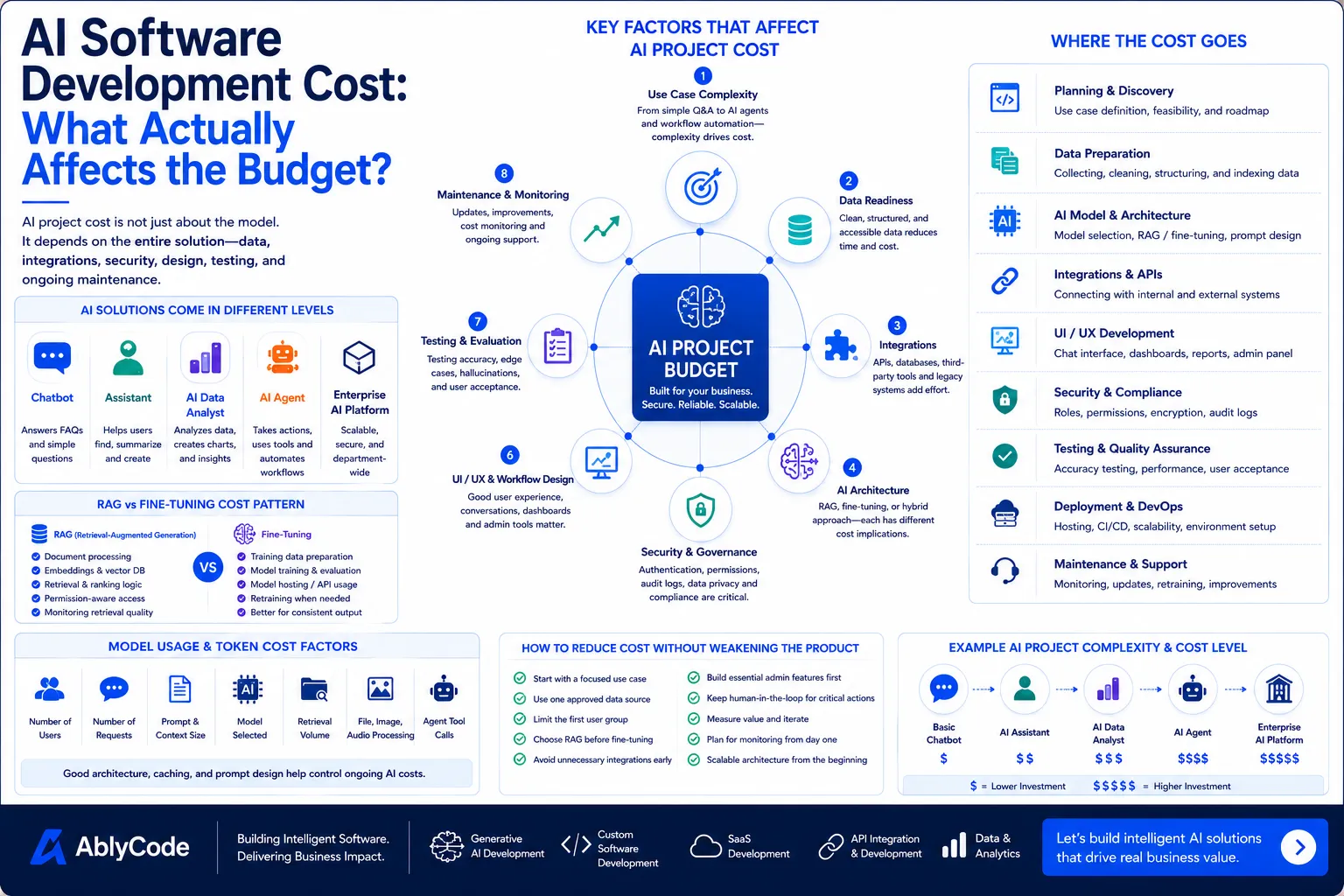
But AI software development cost is not determined by the word "AI" alone. A basic chatbot, an internal knowledge assistant, an AI data analyst, an AI agent, and an enterprise workflow automation system can all use artificial intelligence, but they are very different products.
The budget depends on what the system needs to do, what data it uses, how many tools it must connect with, how secure it needs to be, and how much control the business needs over accuracy and output quality.
In other words, the cost of an AI project is not only about the model.
It is about the full product around the model.
Many businesses assume AI cost mainly depends on the AI model or API usage.
Model cost matters, but it is only one part of the budget.
A business-ready AI product usually includes:
That is why two AI projects can have very different budgets even if they use the same model.
A simple AI assistant that answers questions from a small document set is very different from an AI agent that reads business data, checks permissions, connects to multiple systems, prepares recommendations, and triggers workflows for approval.
The more business responsibility the AI system carries, the more carefully it must be designed.
The biggest cost driver is the use case itself.
A narrow AI use case is easier to build, test, and maintain.
A broad AI use case needs more design, more data work, more integrations, and more governance.
For example, these projects are not equal:
Each level adds complexity.
A chatbot may only need a clean interface and a controlled knowledge base.
An AI data analyst may need governed metrics, database access, chart rendering, exports, and role-based permissions.
An AI agent may need workflow orchestration, approval logic, action logs, fallback handling, and human review.
The more the AI moves from answering questions to completing work, the more the budget increases.
Businesses often use these terms loosely, but they affect cost.
A chatbot usually answers questions through a conversational interface.
It may be used for FAQs, support, onboarding, or internal help.
This is often the simplest AI product type.
An assistant usually helps users complete a task.
It may search documents, summarize information, draft responses, generate reports, or guide users through workflows.
This requires more context and better output design than a simple chatbot.
An AI data analyst connects to business data and answers analytical questions.
It may generate charts, tables, exports, summaries, and follow-up analysis.
This requires data access, metric definitions, permission control, and result validation.
An AI agent can interpret intent, decide next steps, use tools, and trigger actions within defined boundaries.
This may involve multiple systems, workflow rules, approvals, and audit logs.
Agents are usually more expensive because they carry more operational responsibility.
AI systems are only as useful as the data they can access.
If the data is clean, structured, approved, and easy to connect, the project moves faster.
If the data is messy, scattered, duplicated, outdated, or locked inside old systems, more effort is required.
Common data issues include:
Before building the AI layer, the team may need to clean, organize, classify, or restructure data.
That adds cost, but it also improves reliability.
A weak data foundation creates weak AI outputs.
Many business AI applications use RAG, fine-tuning, or both.
RAG, or Retrieval-Augmented Generation, connects the AI system to business information at answer time. It is useful when the AI needs current knowledge from documents, databases, APIs, or internal systems.
Fine-tuning trains a model further so it follows a specific style, classification pattern, format, or task behavior.
The cost pattern is different.
RAG is often a good starting point when business information changes frequently.
Fine-tuning can be useful when the business needs highly consistent output behavior.
For many companies, RAG is the more practical first step. Fine-tuning becomes useful when there are enough high-quality examples and a stable output pattern.
AI becomes more valuable when it works inside real business systems.
That usually means integrations.
An AI system may need to connect with:
Each integration adds effort.
The cost depends on whether the system has clean APIs, good documentation, stable permissions, and reliable data structure.
A simple integration with a modern API may be straightforward.
An integration with a legacy system may require more planning, testing, and custom handling.
If the AI needs to take actions inside other systems, not just read data, the complexity increases further.
AI projects often touch sensitive business data.
That may include customer records, sales numbers, financial data, contracts, internal documents, operational metrics, or employee information.
Security and access control directly affect cost.
A business-ready AI system may need:
These controls take time to design and build.
But skipping them can create serious risk.
The more sensitive the data, the more important security becomes.
A technically strong AI system can still fail if users do not understand how to use it.
Good user experience matters.
Users need a clear interface, helpful prompts, readable answers, source visibility, loading states, error handling, and easy next steps.
For example, an AI data analyst may need:
An AI workflow tool may need:
Designing these experiences adds cost, but it improves adoption.
The goal is not only to make AI work.
The goal is to make AI useful for real users.
Traditional software testing checks whether a system behaves as expected.
AI testing is more complex because outputs can vary.
A business AI system needs evaluation.
The team should test:
For RAG systems, testing should check whether the right sources are retrieved.
For fine-tuned systems, testing should check whether the output follows the required pattern.
For AI agents, testing should check whether actions happen only within safe boundaries.
Good testing adds cost, but it prevents unreliable AI from reaching users.
Ongoing AI usage cost depends on how often the system is used and how much context each request needs.
Costs may be affected by:
A simple FAQ assistant may have low usage cost.
An AI data analyst that processes large queries, retrieves documents, generates charts, and creates exports may cost more per interaction.
A good AI architecture should monitor usage cost from the beginning.
Without cost tracking, AI products can become expensive unexpectedly.
Many AI projects need admin functionality.
This may include:
These features may not be visible to end users, but they are important for operating the product.
A prototype may not need a full admin panel.
A production system usually does.
AI software is not finished at launch.
It needs monitoring and improvement.
After launch, teams may need to:
This ongoing work should be part of the budget.
An AI product that is not maintained will slowly become less reliable as business data, user needs, and systems change.
AI prototypes can be built quickly.
That is useful for validating ideas.
But prototypes and production systems are different.
A prototype may skip permissions, admin tools, monitoring, error handling, strong testing, and reliable integrations.
A production system cannot.
The budget changes when the system must be used by real employees, customers, or executives.
Production AI needs:
This is why a demo may look inexpensive, but a real business AI product requires a larger investment.
The best way to reduce cost is not to cut important foundations.
The better approach is to reduce scope.
Start with one strong use case.
Use one approved data source.
Limit the first user group.
Avoid unnecessary integrations in version one.
Start with RAG before fine-tuning if current knowledge is the main need.
Keep human review for risky actions.
Build only the admin tools needed for the first release.
Measure value before expanding.
A focused AI product can still be powerful.
It is better to launch one reliable workflow than five weak ones.
Before estimating an AI project, answer these questions:
These questions make the budget clearer.
They also prevent the team from building the wrong thing.
Every project is different, but businesses can think in broad levels.
A focused assistant for FAQs or a small document set.
Usually includes a simple interface, document search, answer generation, and basic admin handling.
Best for early pilots.
A tool that helps with document processing, internal workflows, reporting, or support operations.
Usually includes better UI, data processing, permissions, integrations, and testing.
Best for real operational use.
A system that connects to business data, answers plain-English questions, creates charts and tables, and supports exports.
Usually requires data access, metric definitions, role-based permissions, visualization, and result validation.
Best for business intelligence and leadership use.
A system that can use tools, trigger actions, route tasks, prepare recommendations, and support approval workflows.
Usually requires strong orchestration, integrations, logs, review states, and guardrails.
Best for automation-heavy use cases.
A larger system supporting multiple departments, multiple data sources, advanced permissions, governance, monitoring, and long-term scalability.
Best for companies making AI part of core operations.
At AblyCode, we estimate AI software projects by looking at the full product, not only the model.
We consider:
Our goal is to help businesses start with the right version.
Not too small to be useful.
Not too large to become slow and expensive.
The best AI projects begin with a clear use case, a practical first release, and an architecture that can grow.
AI software development cost varies because AI products vary.
A chatbot, a knowledge assistant, an AI data analyst, and an AI agent are not the same kind of system.
The cost depends on the workflow, data, integrations, security, architecture, user experience, testing, and long-term maintenance.
The most expensive mistake is not spending too much.
It is building the wrong AI product.
A focused, well-designed AI system can reduce manual work, improve decisions, and create real business value.
But that only happens when the budget is tied to the business problem, not the hype.
AblyCode helps businesses design, build, and scale AI assistants, AI data analysts, workflow automation tools, AI agents, SaaS AI features, and enterprise-ready AI platforms.