
AI agents are quickly becoming one of the most discussed topics in business software.
But the most important question is not:
Can we build an AI agent?
The better question is:
What should the agent automate first?
That decision matters because not every workflow is a good first candidate for AI automation. Some processes are too risky. Some depend on messy data. Some need human judgment. Some are not repeated often enough to justify automation.
The best AI agent projects usually start with workflows that are repetitive, measurable, supported by clear rules, and painful enough that automation creates visible value.
AI agent development should not begin with hype.
It should begin with business friction.
Where does your team lose time every week? Where do people copy information between systems? Where do requests wait because someone has to classify, summarize, route, or prepare them manually?
Those are the places where AI agents can create real value.
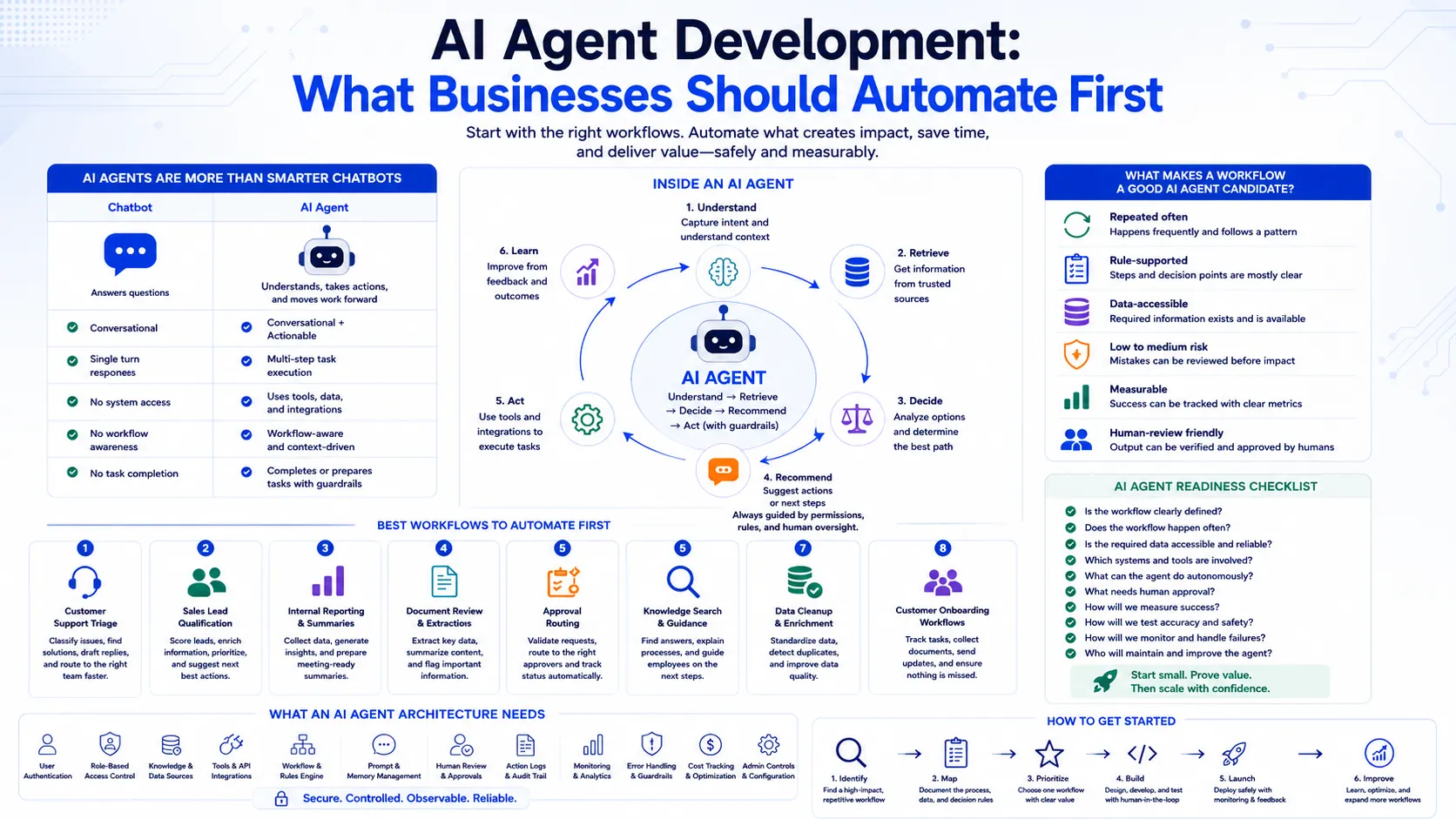
A chatbot answers questions.
An AI agent can help move work forward.
That is the key difference.
A chatbot may respond to:
What is our refund policy?
An AI agent may:
This is why AI agents are different from ordinary AI assistants. They are not only conversational. They are workflow-aware.
They can understand intent, retrieve context, use tools, recommend next steps, and trigger actions within defined boundaries.
That makes them powerful.
It also means they need strong guardrails.
One of the biggest mistakes companies make is trying to automate too much too early.
AI agents can be exciting, so teams often imagine large systems that handle everything across sales, support, operations, finance, HR, and reporting.
That usually creates complexity before value.
A better approach is to start with one narrow workflow where the agent can prove its usefulness.
The first workflow should be:
The goal of the first AI agent should not be to replace an entire department.
The goal should be to reduce one meaningful bottleneck.
A workflow is a good AI agent candidate when it has a clear pattern.
For example:
A poor first candidate is usually the opposite.
The workflow is rare, ambiguous, high-risk, poorly documented, or dependent on judgment that cannot be easily reviewed.
AI agents work best when they are given a clear operating space.
They should know what they can do, what they cannot do, when to ask for help, and when to stop for human approval.
Customer support triage is one of the strongest first use cases for AI agents.
Many support teams spend time reading incoming tickets, identifying the issue type, checking customer details, finding the right policy, and assigning the request to the right queue.
An AI agent can help by:
This does not mean the agent must fully resolve every issue.
In the first version, the agent can focus on triage and preparation.
That alone can reduce response time and help support teams work more consistently.
Good support agent automation should include human review for sensitive cases, refunds, legal complaints, account cancellations, or anything involving high customer impact.
Sales teams often receive leads from websites, events, campaigns, referrals, and outbound activity.
Not all leads are equal.
Some are ready to talk. Some need nurturing. Some are not a good fit. Some are missing important information.
An AI agent can help sales teams move faster by:
This can reduce manual research and help sales teams respond faster.
The agent should not replace sales judgment. Instead, it should prepare context so the salesperson can make a better decision.
For growing businesses, lead qualification is valuable because speed matters. A lead that waits too long often becomes a missed opportunity.
Many teams spend hours preparing recurring updates.
Weekly sales summaries.
Monthly operations reports.
Project status updates.
Customer success reviews.
Support trend summaries.
Finance snapshots.
Leadership briefings.
An AI agent can help by collecting information from approved sources and preparing a structured summary.
For example, it can:
This is a strong use case because it saves time without requiring the agent to take risky actions.
The first version can produce drafts that humans review before sharing.
Over time, the system can become more useful by learning preferred formats, recurring metrics, and department-specific reporting needs.
Many business workflows are slowed down by documents.
Invoices.
Contracts.
Purchase orders.
Forms.
Resumes.
Customer onboarding files.
Compliance documents.
Insurance claims.
Vendor submissions.
An AI agent can help by extracting key information and preparing the document for review.
It can:
This is especially useful when teams handle high document volume.
The agent should not automatically approve high-risk documents unless the process is very controlled. But it can reduce the time spent reading, organizing, and preparing documents for human review.
Approval workflows often look simple, but they create hidden delays.
A request comes in.
Someone checks the amount.
Someone checks the department.
Someone checks whether the required details are present.
Someone forwards it to the right manager.
Someone waits.
Someone follows up.
An AI agent can help by preparing and routing the request.
It can:
This is useful in finance, procurement, HR, operations, sales, and project management.
The agent does not need to approve everything. It can reduce coordination overhead and make approvals easier to review.
For higher-risk approvals, the agent should stop and ask for human confirmation.
Internal teams often lose time looking for information.
They ask teammates where a document is.
They search old messages.
They open multiple systems.
They ask the same questions repeatedly.
An AI agent can help employees find the right information and guide them through tasks.
Examples:
How do I onboard a new client?
What is the process for requesting access?
Where is the latest deployment checklist?
What steps are needed for vendor approval?
Which policy applies to this situation?
The agent can retrieve relevant information, summarize it, and suggest the next step.
This is different from a basic knowledge chatbot when the agent can also help complete the workflow, such as creating a task, preparing a checklist, or routing a request.
Business systems often contain incomplete or inconsistent data.
CRM records may be missing industry, company size, region, or notes.
Product catalogs may contain inconsistent descriptions.
Customer records may be duplicated.
Support tickets may be poorly tagged.
Project management tools may have unclear task titles.
An AI agent can help clean and enrich this data.
It can:
This can improve reporting, sales operations, support analytics, and workflow automation.
Data cleanup is a good early AI agent use case because the agent can suggest changes and humans can approve them.
Customer onboarding often includes many repeated steps.
Collect documents.
Create accounts.
Send welcome emails.
Confirm requirements.
Assign internal owners.
Schedule kickoff calls.
Track pending items.
Set up access.
Share training material.
An AI agent can help coordinate the process.
It can identify what is missing, generate checklists, draft emails, update statuses, and notify the right people.
This improves consistency and reduces the chance that a customer gets stuck because one step was missed.
For SaaS companies and service businesses, onboarding automation can directly improve customer experience.
AI agents should not act freely everywhere.
The right control model is important.
Human review should remain in workflows involving:
The point is not to block automation. The point is to design the right level of control.
In some cases, the agent can act automatically.
In other cases, it should recommend and wait.
In high-risk workflows, the agent should prepare the work but keep the final decision with a human.
Good AI agent development is not about maximum automation.
It is about useful automation with the right guardrails.
A business-ready AI agent is more than a prompt.
It needs a complete software architecture.
Important components include:
The agent must know what tools it can use, what data it can access, what actions it can take, and what boundaries it must respect.
Without architecture, an AI agent becomes a risky demo.
With the right architecture, it becomes a reliable workflow layer.
Before building an AI agent, ask these questions:
If these questions are unclear, the project may need more discovery before development begins.
Start with workflows that have high repetition and low-to-medium risk.
Good first choices include:
Avoid starting with workflows that involve high legal, financial, medical, or security risk unless the control model is very strong.
A good first AI agent should be useful even if it only prepares work for humans.
That is often where the fastest value appears.
An AI agent should be measured like a business system.
Useful metrics include:
If the project cannot be measured, it becomes harder to improve.
Clear metrics help teams decide whether to expand the agent, refine it, or keep it limited.
If the workflow is unclear, the agent will be unclear.
Teams should map the process before building.
Agents need boundaries.
They should not have broad access or action power without controls.
The agent must respect user roles and data access.
It should not reveal information that the user cannot normally see.
Human review is important when the action carries risk.
The agent should know when to stop.
Every important action should be traceable.
Logs help with debugging, compliance, and trust.
The first version should avoid unnecessary integration complexity.
Start with the systems needed for one useful workflow.
At AblyCode, we build AI agents as secure business workflow systems, not just chat interfaces.
Our approach starts with understanding the workflow.
What slows the team down?
What information is needed?
Which systems are involved?
Where can AI help?
Where should human review remain?
From there, we design the right architecture.
That may include RAG, APIs, workflow automation, dashboards, approvals, audit logs, admin controls, and monitoring.
We help businesses build AI agents for support, sales, reporting, document processing, customer portals, SaaS products, and internal operations.
The goal is simple:
AI agents can change how businesses work, but only when they are applied carefully.
The best first use case is not always the most impressive one.
It is the one that removes a real bottleneck, saves measurable time, and can be controlled safely.
Businesses should not begin by asking what AI can automate.
They should begin by asking where work slows down.
That is where AI agent development becomes practical.
Not as a replacement for people.
But as a workflow layer that helps teams move faster, reduce repetitive effort, and focus on higher-value decisions.
AblyCode helps companies design and build AI agents, workflow automation tools, AI assistants, document intelligence systems, and AI-powered SaaS features.